Documentation
Register Cluster
Register your cluster and complete prerequisites for automated SBE downloads.
What is this for?
Cluster registration is used by DataON to grant access to key SBE portal capabilities for your organization.
- DataON SBE update package files for side-load
- DataON SBE automated download connector workflow
- Additional SBE update guidance and support resources
Before you continue
Complete each step below in order. After registration succeeds, continue to installation guide step 6 to enable automatic setup.
Step 0
Step 0 - EULA
By registering your clusters with the script below, you agree to share cluster information with DataON including the described categories in the DataON EULA.
Step 1
Step 1 - Cluster Registration
Copy the script below or click "Download" to save it as a PowerShell (.ps1) file. The main purpose of the script is:
- Keeping track of which clusters have performed SBE updates
- Unlock one of the two requirements for automatic DataON SBE Package Download after running "Start-SolutionUpdate" on Azure Local (see step 3 for second requirement).
Now run the script in the terminal and wait for the registration to finish and move to the next step.
Step 2
Step 2 - Verify Cluster Registration
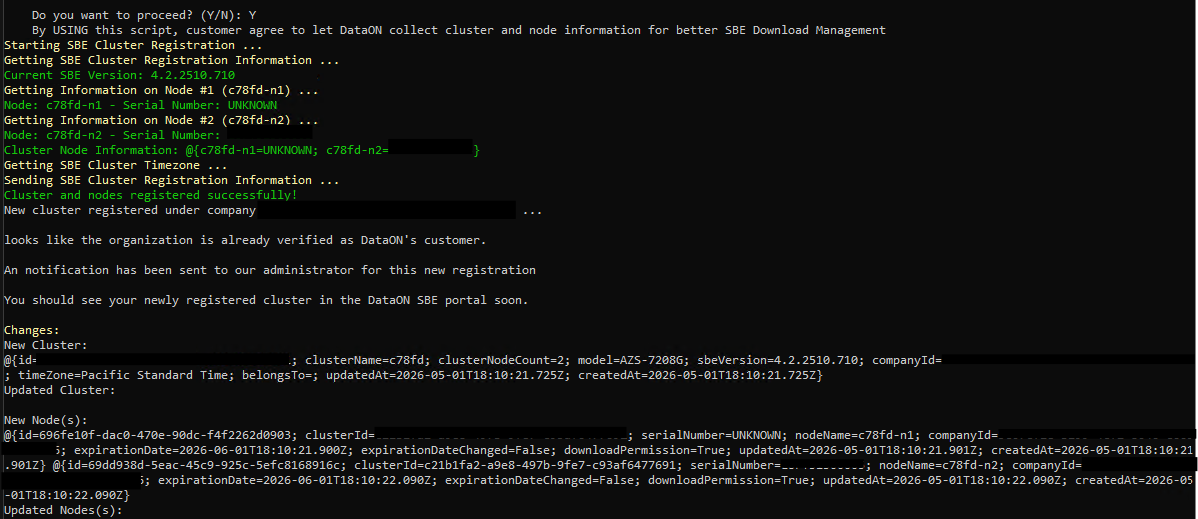
Verify that the cluster is registered successfully.
- Look at the output of the script in the terminal. If the output are all GREEN and mentioned "Cluster and nodes registered successfully!", the registration of the cluster and all nodes within should be completed.
- Go to the the manage page, the newly registered cluster should appear.
- The first registration of a company will be treated as a request to access the SBE update packages and you will receive an email from us for this action. You can check your status via the manage page under "Side-Load File Access".
Step 3
Step 3 - Enable SBE Automatic Download
Two requirements are needed for using the DataON SBE Download Connector to update:
- Azure Local Cluster is registered on the SBE Portal (step 1) (check if you can see the cluster on the manage page)
- Azure Local Cluster is 'enabled' to use SBE Download Connector (will be explained below)
After registering the cluster, run the commands below on one of the cluster node to enable download through SBE partner property:
#Set the SBE update partner property on the cluster
 Set-SolutionExtensionProperty -PropertyHash @{EnableSBEDownload='true'}
 #Verify whether the update property is set correctly (should see EnableSBEDownload = true)
 Get-SolutionExtensionProperty
Registration complete
Your cluster is registered. Next, confirm updates and continue with automated setup when ready.